Generate with AI
You don’t need a finished script or a recorded voiceover to use your own inputs. AI can write both for you in the composer, as two separate attachments:
- A script, through Add Custom Script → Generate with AI.
- A voiceover, through Add Voiceover, which opens the same tools as Voice Studio.
You can use one, the other or both. Each one is added as an attachment in your prompt box, ready to generate a video with.
Your attachment options
| Button | Option | What it does |
|---|---|---|
| Add Custom Script | Paste Your Text | Paste a script you already have. |
| Add Custom Script | Upload from Computer | Attach a script file (.txt or .md, up to 1 MB). Add from Media Library, also on this menu, picks a script document you uploaded before. |
| Add Custom Script | Generate with AI | Describe your video and AI writes the script. |
| Add Voiceover | Upload from Computer | Attach an audio file you recorded. |
| Add Voiceover | From Media Library | Pick audio you uploaded before. |
| Add Voiceover | Voiceover Generations | Pick a voiceover you made in Voice Studio. |
| Add Voiceover | Generate with Voice Studio | Generate a new voiceover from a script. |
| Add Voiceover | Generate with Script | Write the script with AI first, then turn it into a voiceover. |
Generate a script
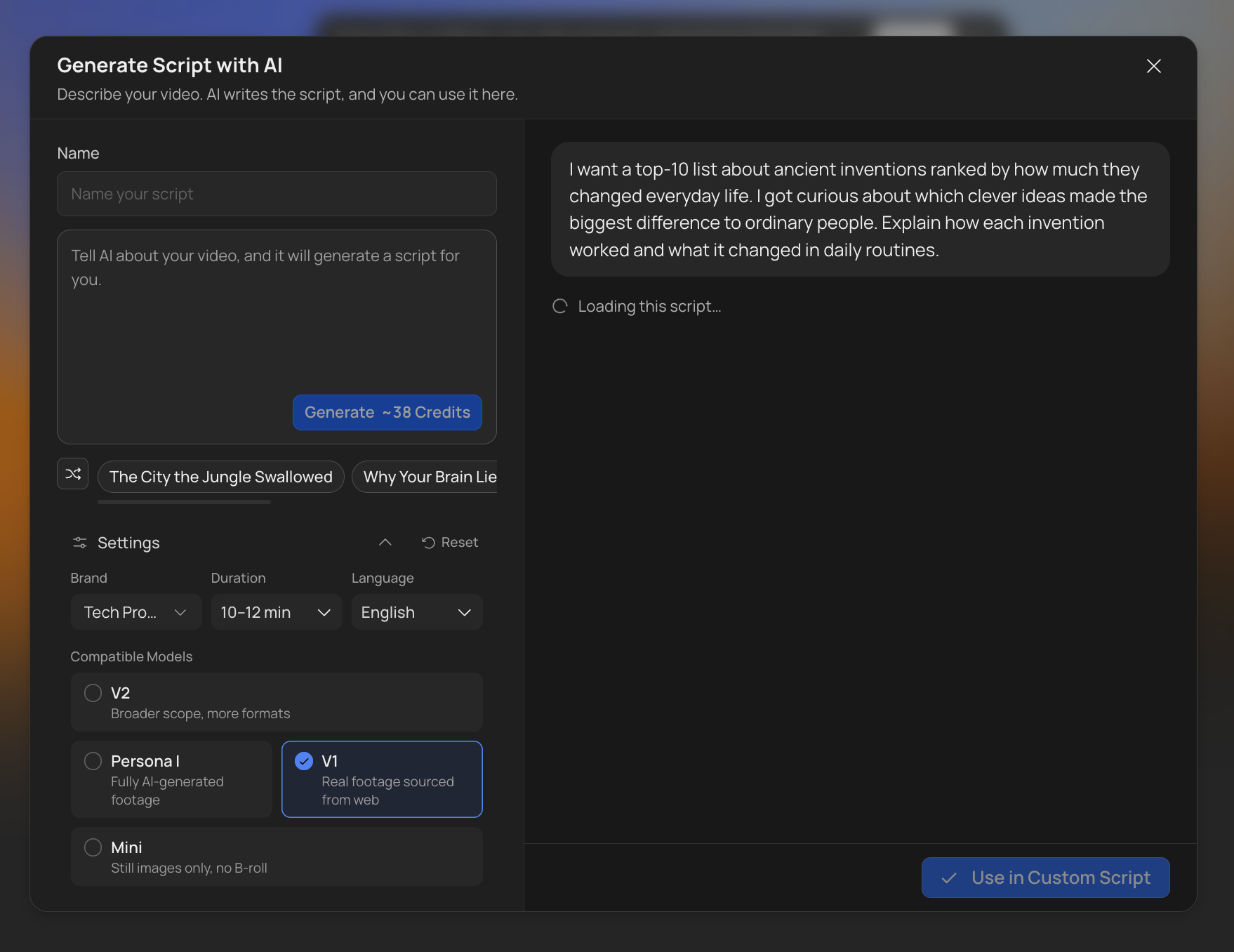
- Click Add Custom Script, then Generate with AI.
- Name your script.
- Tell the AI about your video: the topic, the angle, what to cover. Not sure where to start? Click a starting point, or shuffle for more ideas.
- Open Settings to choose the Brand profile, the Duration, the Language and the Compatible Models the script should fit (V2, Persona, V1 or Mini). Scripts can be 6 to 60 minutes long, in English, German or Spanish, and follow your brand profile’s script style.
- Click Generate.
- When the script is ready, review it and click Use in Custom Script.
The script is written to fit the duration and models you picked, so it passes the length check when you generate the video. Writing continues if you close the page. Because VidRush researches your topic to find supporting evidence, a script can take around 25 minutes.
Your past scripts appear under Recent Scripts on the right, with their status, length, language and when you made them. Click one to reuse it.
Generate a voiceover
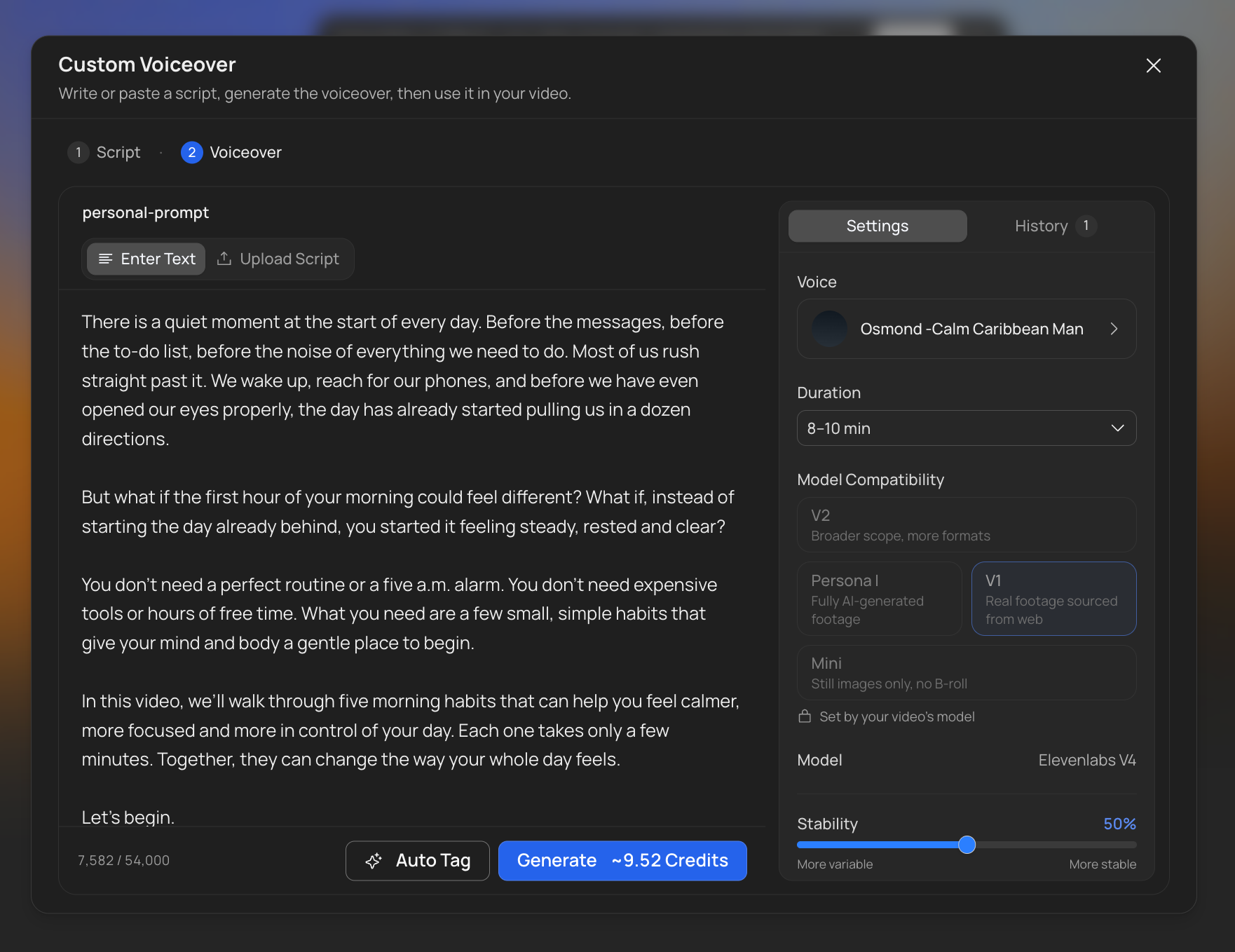
Click Add Voiceover and choose how to make it:
- Generate with Voice Studio: paste or upload a script and turn it into a voiceover.
- Generate with Script: two steps. First the AI writes the script, then you turn it into a voiceover.
The voiceover step works like Custom Voiceover in Voice Studio. Pick a voice and a duration, use Auto Tag if you want more expressive delivery, then click Generate. The model is set by your video, so the voiceover will fit it. When it’s ready, click Use This to attach it to your prompt. Every voiceover is also saved to your Media Library, so if you close the window first, you can still attach it later from Add Voiceover → Voiceover Generations.
What it costs
Scripts cost 3.5 credits per 1,000 characters on every plan, about 32 credits for a 10-minute script. When a run starts, VidRush holds a little extra (about 41 credits for 10 minutes); you pay only for what’s written, and the rest comes back. Nothing is charged if it fails.
Voiceovers cost the same as in Voice Studio, 1.256 credits per 1,000 characters. Both are charged separately from the video, and each button shows its estimate before you confirm.
Good to know
- Scripts made here count as a Custom Script, and voiceovers as Voice Studio voiceovers. Everything on those pages still applies, including the Input Validation checks.
- Make sure the script length fits your model. V2 needs a longer script (10 to 30 minutes) than v1, Persona I and Mini.
- Custom Script can also start from a script saved in your Media Library (a script document you uploaded). Picking one opens its text in the script editor. The editor won’t save a script that’s too short or too long: on V2 the minimum is 10 minutes, and on other models it’s 6 minutes (about 780 words at an average pace).